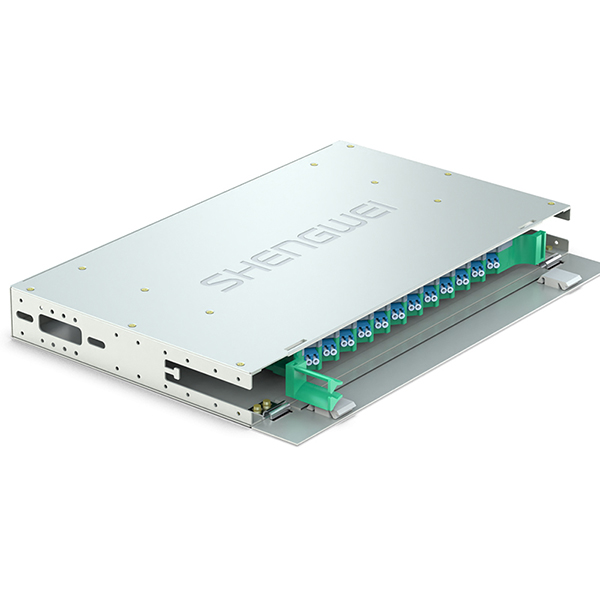
Every outside plant cable that enters a central office, an OLT room or a data center ends at the same place: an optical distribution frame. If the ODF is undersized, crews run out of ports within a year. If it has the wrong adapters, every change needs a special patch cord.
Most ODF articles stop at “rack mount or wall mount”. This guide covers what comes next: how many rack units you need, splicing versus pre-terminated, which adapter and polish to choose, and the mistakes that appear at the first expansion.
What an Optical Distribution Frame Does
An optical distribution frame (ODF) is the point where outside plant or backbone cables are turned into connectorized ports. Inside, incoming cables are clamped to the frame, buffer tubes are routed to splice trays, and each fiber is spliced to a pigtail that ends at an adapter on the front panel. Patch cords then connect those ports to the OLT, switch or transmission equipment.
When a circuit changes, technicians move a patch cord instead of re-splicing fiber.
The ODF is often confused with two other enclosures in an FTTH network:
| Device | Where it sits | Main job |
|---|---|---|
| Optical distribution frame | Central office, OLT room, data center | Terminates feeder or backbone cables onto patch ports |
| Fiber distribution box | Street cabinet, pole or building | Splits and distributes fibers toward subscribers, often with a PLC splitter |
| Fiber optic terminal box | Wall or floor of a building | Connects drop cables to individual homes |
For the subscriber end of the network, see our guide to fiber optic terminal boxes in FTTH networks.
Rack Mount, Wall Mount or Floor Standing ODF
The form factor follows the site.
| Type | Typical capacity | Best for |
|---|---|---|
| Rack mount (1U–4U units) | 12 to 144+ fibers per unit | OLT rooms, data centers, enterprise equipment rooms |
| Wall mount | Low to medium counts, often 12–96 fibers | Small POPs, building entrance rooms, sites without racks |
| Floor standing frame | Hundreds to thousands of fibers | Central offices and large carrier hubs |
Check the rack standard before ordering. Most data centers and enterprise sites use 19-inch racks, while many European telecom operators use ETSI racks, which need different mounting brackets.
How to Size an Optical Distribution Frame
Undersizing is the most common ODF mistake, because the frame is chosen for the cable installed on day one. Use this method:
- Count the fibers to terminate. Include every fiber that needs a port now, plus dark fibers you expect to light in the next three to five years.
- Choose the adapter type. It sets the port density per rack unit (see the table below).
- Add a growth margin. Plan at least 25% spare ports.
- Count splice trays. Divide the spliced fibers by the splices per tray, commonly 12 or 24, and add one spare tray.
- Leave room for patch cords. Allow one horizontal cable manager for every one or two panels.
| Adapter type | Typical fibers per 1U | Notes |
|---|---|---|
| SC simplex | 24 | Common in PON and telecom rooms; easy to handle |
| LC duplex | 48 (24 duplex ports) | Common in data centers; twice the density of SC |
| High-density LC | Up to 96 | Needs careful patch cord management |
| MPO cassette | 96 to 144 | Pre-terminated trunks for data center backbone links |
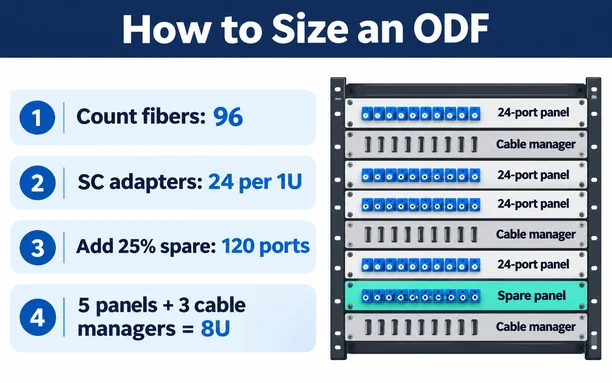
For example, 96 fibers on SC adapters need four 24-port 1U panels. With a 25% margin, plan for 120 ports, or five panels. Add three cable managers and reserve 8U, not 4U.
Key ODF Configuration Choices
Once the size is fixed, four choices decide how easy the ODF is to maintain.
Splice-and-Patch or Pre-Terminated
A splice-and-patch ODF arrives with pigtails and adapters installed. Crews fusion-splice the incoming cable to the pigtails on site. This suits outside plant cables, because the exact cable length is only known at installation.
A pre-terminated ODF connects to a factory-terminated trunk cable, so no splicing is needed on site. It installs faster with tested loss, but the trunk length must be measured before ordering. It is most common in data centers.
Adapter Type and Polish: SC, LC, UPC or APC
Match the adapters to the network’s existing standard and to the equipment. PON networks usually use SC/APC on the ODN side, because the angled end face gives better return loss. Many OLT PON ports use UPC connectors, so the patch cord between the OLT and the ODF is often a hybrid SC/UPC to SC/APC cord. Connector interfaces are defined in IEC 61754, and performance grades in IEC 61753.
Never mate a UPC connector with an APC connector. The air gap causes high loss and can damage both end faces.
Sliding or Fixed Trays
Sliding ODFs pull out like a drawer, so technicians can reach the splice trays without removing the unit from the rack. They suit sites with frequent changes and racks with no rear access. Fixed ODFs cost less and are fine when the frame is spliced once and rarely opened.
Cable Entry, Clamping and Grounding
Check the size of the cable entry holes and whether the strength member clamp fits your cable. Armored cables must be bonded to the rack ground through the ODF’s grounding terminal. If the datasheet does not show these details, ask before ordering.
Real-World Example: An OLT Room for a Regional ISP
Consider a regional ISP building a new OLT site for an FTTH expansion. Two 48-fiber armored feeder cables arrive through overhead cable trays, and the OLT sits in the next rack.
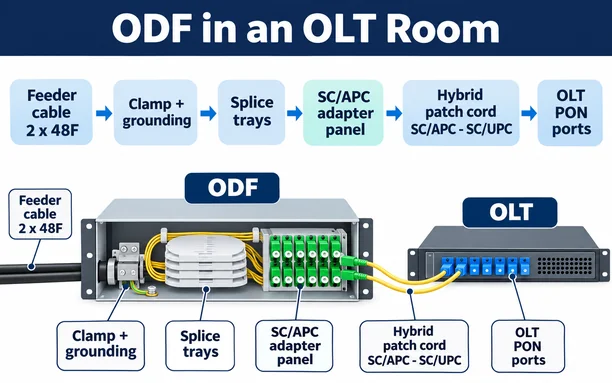
A sensible specification:
- Frame: rack mount, sliding, in a 19-inch cabinet beside the OLT
- Capacity: five 24-port SC/APC panels (120 ports) for 96 incoming fibers
- Termination: splice-and-patch, with G.652.D pigtails to match the feeder fiber
- Patching: hybrid SC/UPC to SC/APC patch cords if the OLT ports are UPC
- Labeling: every port labeled with cable, tube and fiber number before the first patch cord goes in
- Grounding: feeder armor bonded through the ODF grounding kit
Outside the building, the feeders pass through splice closures before reaching fiber distribution boxes; see our fiber splice closure guide.
Common ODF Mistakes
Most ODF problems appear at the first expansion or the first fault. Watch for these:
- No spare ports. A full frame forces a second ODF in another rack, with long patch cords between them.
- Mixed polish types. UPC and APC adapters in the same panel lead to wrong patch cords and damaged connectors. Follow the color code: blue for UPC, green for APC.
- No port map. Record which fiber is on which port; without it, every change starts with tracing.
- Dirty connectors. Inspect and clean every end face before mating. Most high-loss ports are caused by contamination, not broken fiber.
Frequently Asked Questions About Optical Distribution Frames
These are the questions buyers ask most often when specifying an ODF.
What is the difference between an ODF and a fiber patch panel?
A fiber patch panel is a single panel of adapters. An ODF is the complete termination system: cable clamping, splice trays, patch panels and cord management.
How many fibers fit in a 1U ODF?
Typically 24 fibers with SC adapters and 48 with LC duplex adapters. High-density LC and MPO designs can fit 96 or more.
Do I need APC adapters on an ODF for FTTH?
In most PON networks, yes, because the ODN uses SC/APC connectors. Check the OLT port type, and use hybrid patch cords if the OLT has UPC ports.
Building an ODF That Grows With the Network
- Size the frame for the next three to five years, not for day one.
- Match adapters and polish to the network standard, and keep them consistent.
- Use sliding trays where crews will return often.
- Treat labeling, cable management and grounding as part of the specification.
SHENGWEI manufactures rack-mount, wall-mount and splice-and-distribution ODFs for telecom rooms and data centers. Browse our optical distribution frame range, or send us your fiber count, adapter type and rack standard for a matching configuration.
Need Help Choosing an Optical Distribution Frame?
Tell us your incoming fiber count, connector type (SC or LC, UPC or APC), rack standard (19-inch or ETSI) and whether you will splice on site. Our engineers will recommend a matching ODF configuration and send datasheets with project pricing.